Zero to Agent: Build Your First AI Agent in 10 Days
Have you ever chatted with ChatGPT and wished you could make it do something specific — like plan a whole trip or help you study? That is exactly what you will build during this 10-day global competition by Vercel, v0, and Google DeepMind. No coding experience required.

10
Days to build
$6K+
Total prize pool
0
Lines of code needed
Vercel & DeepMind
Organised by
What is an AI Agent?
Think of an AI agent as a smart assistant that can take action, not just chat. It uses a brain (like Google's Gemini) to understand your request, and connects to external tools to actually get things done.
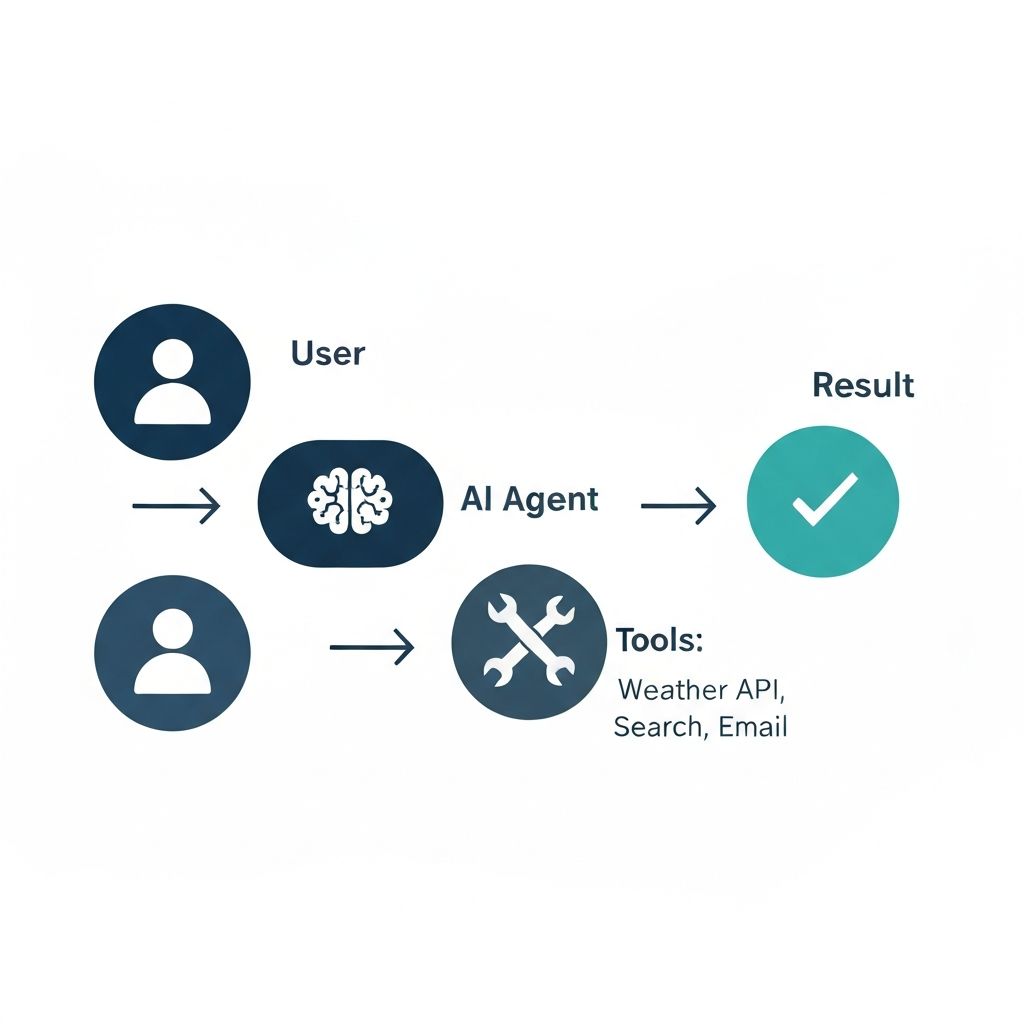
How an AI agent works: User → Agent (AI brain) → Tools → Result
It understands you
An AI agent uses a powerful language model (like Google Gemini) as its brain. It understands plain English — you talk to it like a person, describe what you want, and it figures out the intent behind your words.
It responds intelligently
Just like ChatGPT, it replies with helpful, context-aware text — summaries, answers, plans, explanations. But it does not just generate text blindly; it reasons about your goal before responding.
It takes real action
This is the key difference. An agent can call external tools — fetch live weather data, look up a recipe, generate a study plan, search the web — and chain those actions together automatically to complete a complex task.
Real things your agent could do:
The No-Code Building Stack
Three tools. Zero code. A working AI agent deployed on the internet.
Design your UI with plain English prompts
Go to v0.app and type what you want. v0 generates a complete, working React front-end — buttons, chat interface, dark mode, animations — without you writing a single line of code.
Connect the AI brain
An API key is like a special ID card your app shows to an AI service to say “I have permission to use you.” Get one for free from Google Gemini, Groq, or Together AI — no credit card required for any of them.
One click to go live
Click the Publish button in the top-right corner of v0. Sign in with GitHub, and your app is live at your-app.vercel.app within 30 seconds. Share the URL with anyone in the world.
Get Your Free API Key — Step by Step
Pick the provider that suits you. All are free with no credit card required.
Google Gemini — The Easiest to Start
The Gemini API is completely free to get started and does not require a credit card. You can get a key in minutes with your standard Google account. It is the best place to start, especially for your first project.
How to get your key
- 1Go to aistudio.google.com and sign in with your Google account.
- 2Click the "Get API Key" button in the left sidebar.
- 3Click "Create API key" — choose "Create API key in new project".
- 4Copy your new key. It starts with AIza… Store it somewhere safe immediately.
Rate limits (free tier)
GEMINI_API_KEYNo credit card required. Free tier is generous enough for a competition demo app.How to Add Your API Key to v0 Securely
Environment variables are secure containers — your key is never exposed publicly.
- 1In your v0 project, click the settings icon (top right of the screen).
- 2Select "Vars" from the menu that appears.
- 3Click "Add" and type the variable name — e.g. GEMINI_API_KEY.
- 4Paste your API key into the "Value" field.
- 5Click "Add Variables" to save it securely.
- 6Now tell v0: "Use the environment variable GEMINI_API_KEY for the AI calls."
Example prompt to use after adding your key:
"Use the Gemini API key stored in environment variable GEMINI_API_KEY to power the AI responses in this chat interface. When the user sends a message, call the Gemini API and display the response as a message bubble."
How to Write Winning Prompts for v0
The key is to be specific and provide context. A great prompt builds a great UI and saves you time. Think of it as giving crystal-clear instructions to a very capable assistant.
The four-part prompt formula
Goal
What should the app do? Be specific about the task it solves.
Structure
What sections or layout? (e.g. sidebar, two-column, card grid)
Context
Which API and environment variable will power the AI?
Style
Colors, font size, dark mode? Describe the look and feel.
Example prompts
Full first prompt — Study Buddy chat app
Create a chat interface titled 'Study Buddy' that uses my Gemini API key from environment variable GEMINI_API_KEY. The user types a question about their lecture notes, and the AI returns a helpful, clear explanation. UI: clean white card layout, navy blue send button, message bubbles on a light grey background. Must have a dark mode toggle in the top-right corner.
Notice: it names the app, specifies the API key variable, describes the exact UI, and mentions dark mode.
Adding a single feature
Keep the current design exactly as it is, but now add a dark mode toggle switch in the top-right corner of the navbar. Do not change anything else.
Start follow-up prompts with "Keep the current design exactly as it is" to prevent v0 from redesigning your whole app.
Fixing a layout bug
Keep the overall design, but fix the alignment of the message history so messages flow from top to bottom and the most recent message is always at the bottom. Do not change colors or fonts.
One instruction per follow-up prompt. Precise scope = reliable fix.
Vague vs. specific prompts
Too vague
Hello.
Specific and useful
Help me plan a weekend budget trip to Rome under €300.
Too vague
Write something.
Specific and useful
Write a 3-paragraph study summary of photosynthesis for a 16-year-old student.
Pro tip — use ChatGPT or another AI to write better v0 prompts
Writing a detailed prompt from scratch is hard. Instead, ask ChatGPT, Gemini, or Claude to write your v0 prompt for you. Describe your idea in plain conversational language, and let the AI turn it into a precise, structured prompt ready to paste directly into v0.
Example: what to say to ChatGPT
I want to build an AI web app using v0.app by Vercel. My idea is:

"A recipe generator where I type the ingredients I have in my fridge and it gives me 3 recipe ideas with cooking steps."

Please write me a detailed, specific prompt for v0 that includes:
- The app name and purpose
- The exact UI layout I want
- The API to use (Gemini, env var: GEMINI_API_KEY)
- The colour scheme and style
- Any buttons, inputs, or special features

Make the prompt as long and detailed as possible so v0 can generate exactly what I want in one go.
ChatGPT will return a detailed, well-structured prompt. Copy that output and paste it straight into v0. This trick alone can save you hours of trial and error.
How to fix bugs without panic
When v0 generates a page that looks broken or is missing a feature, do not delete your project. Give it a precise, single instruction to fix one thing at a time. You will be surprised how quickly it self-corrects.
Project Ideas for Beginners
Pick one, expand the starter prompt, paste it into v0, and you are building. Each idea comes with a detailed prompt you can copy directly — just personalise it with your app name and preferred colour scheme.
Study Planner Agent
User enters exam dates and subjects. The agent generates a personalised day-by-day study schedule. Practical, immediately useful, and easy to demo.
Resume Reviewer Bot
User pastes their CV text and target job title. The agent returns bullet-point feedback on strengths, gaps, and specific improvements tailored to that role.
Budget Travel Assistant
User enters a destination, trip length, and total budget. The agent returns a full day-by-day itinerary with estimated costs per activity and day.
Mental Health Check-in Buddy
User selects their current mood from emoji buttons. The agent returns a supportive affirmation and three personalised coping tips. Calming pastel design.
Recipe Generator from Fridge Items
User types the ingredients they have available. The agent returns three recipe suggestions with full ingredients lists, steps, and cooking time.
Daily Habit Coach
User enters a goal they want to achieve (e.g. exercise more, read daily, learn a language). The agent returns a personalised 7-day habit plan with daily actions, motivational tips, and progress check-in questions.
Deployment in 5 Steps
From finished app to a live public URL in under one minute. v0 and Vercel handle all the technical complexity — you just click a button.
Finish and review your v0 project
Make sure everything looks and works the way you want. Test it by clicking through the UI and sending at least one message to confirm the AI responds correctly.
Click the "Publish" button in v0
Look for the blue Publish button in the top-right corner of your v0 workspace. Click it to start the deployment process.
Sign in to Vercel with GitHub
If you do not have a Vercel account yet, this step creates one automatically. Use your GitHub account — it is free and takes 30 seconds.
Click "Import" — Vercel handles the rest
Vercel automatically detects that your project uses Next.js and configures all the server settings for you. No technical knowledge needed.
Wait about 30 seconds for the green checkmark
You will see a progress indicator as your app builds. When you see the green checkmark and your live URL, your app is officially on the internet.
Tip: You can redeploy anytime by clicking Publish again from v0. Each deploy generates a unique URL. The moment you see the green checkmark, your AI agent is officially live on the internet for anyone to access.
Submission & How to Get Votes
The competition is not just about the code — it is also about the story you tell. Complete this checklist before the May 3 deadline.
Deploy your app and get a live public URL (e.g. your-app.vercel.app). Test it on a different device to confirm it works.
Make sure your project solves a real, practical problem — not just a generic chatbot.
Confirm your project was originally built during this build week (April 24 – May 3, 2026).
Set up or update your LinkedIn and X (Twitter) profiles before the deadline.
Record a 30-second screen recording demo: open the app, type a genuine question, and let the AI respond live.
Post your demo on LinkedIn and X. Tag @Vercel and @v0. Use the hashtag #ZeroToAgent.
Submit your project link on the Vercel Community Showcase (link available on zerotoagent.dev).
Share your post link with friends, classmates, and family and ask them to vote for your project.
How to get more votes — the social media game
Post early and post often
Share your progress even before the app is finished. Show what you are building in stages. This builds an audience before you ask for votes.
Record a compelling 30-second demo
Open the app on screen. Ask a genuine, specific question — not just "hello". Let the AI respond dynamically. A real demo is 10x more convincing than a screenshot.
Tag the right accounts
Tag @Vercel and @v0 on X. Use #ZeroToAgent so organisers and community members can find your post and amplify it.
Ask your network to vote
Send the Showcase link directly to friends, family, and classmates and ask them specifically to click your project and vote. Personal asks get far more response than generic posts.
Prizes — Over $6,000 Total
Build something amazing and walk away with real tools to keep creating — plus an incredible project for your portfolio and CV.
1st Place
$3,000+ in value
- $3,000 in v0 credits — build without limits for a year
- $200/month Vercel Platform credits for 6 months
- Vercel Pro account (unlimited bandwidth and deployments)
- Exclusive Zero to Agent merchandise and swag pack
2nd Place
$1,000+ in value
- $1,000 in v0 credits
- 3 months Vercel Premium platform credits
- Vercel Pro account
- Zero to Agent swag pack
3rd Place
$500+ in value
- $500 in v0 credits
- 1 month Vercel Premium platform credits
- Vercel Pro account
- Zero to Agent swag pack
Beyond the prizes — every submission is a real, deployed AI product you built yourself. That is an incredible portfolio piece for internship applications, job interviews, and your professional profile, regardless of whether you place in the top three.
Frequently Asked Questions
Refer back to this guide whenever you get stuck. If your question is not here, join the competition Discord for direct support.
Quick Links
Everything you need, in one place. Put these in your browser bookmarks now.